
You've probably used quite a few AI tools—chat windows, code completion, writing assistants. But most of them work in isolation: for the same task, you often have to switch between several apps and explain things to different AIs separately. What YGGLab wants to do is put a group of AI Agents on the same desktop and let them actually work as a team to get things done.
1 Get to know YGGLab in one sentence
YGGLab is alocally running AI Agent desktop software. It lives on your own computer, aggregating 20+ AI Agents and 30+ model platforms into one interface. You can assign tasks to it individually, let it collaborate in teams, or even command it remotely from your phone while you're away—keeping things moving 24/7.
2 What can it do for you
Agent collaboration
Automatically detect Claude Code, Codex, and Gemini CLI installed on your computer, letting them work in parallel, each doing their part, or even collaborating as a team.
Built-in assistants
20+ assistants ready out of the box—making PPTs, organizing spreadsheets, writing reports, researching information, fixing code, and replying to emails.
Remote control
Send instructions via WeChat, Feishu, DingTalk, Telegram, or the built-in WebUI. When you leave your seat, Agents keep going.
7×24 automation
Scheduled tasks dispatch Agents for daily code reviews every morning, backups every night, and automatic reports every Monday.
Multi-model freedom
OpenAI, Claude, Gemini, DeepSeek, Tongyi Qianwen, Ollama local models, and 30+ platforms. Different agents can use different models, with no vendor lock-in.
Local privacy
Conversations, files, and task records are all stored locally. API keys are kept in the system keychain, and connections go directly to the model API without any relay.
3 Website and Download
Official website:
Current version v0.1.9. Choose an installer for your system:
macOS · Apple Silicon (.dmg)macOS · Intel (.dmg)Windows x64 (.exe)Direct .exe links are blocked in WeChat. Windows users should click the link above to go to the download section on the official site, then click 'Windows x64' to download.
4 Installation and Getting Started
1 Step 1: Download and install
Pick the installer for your system, and it's ready in a minute. Supports Windows 10+, macOS 12+, Ubuntu 18.04+, and works on a standard office computer.
2 Step 2: Auto-discover agents
On launch, any installed Claude Code, Codex, or Gemini CLI is automatically connected. If you have none installed, no problem—20+ built-in assistants are ready to use.
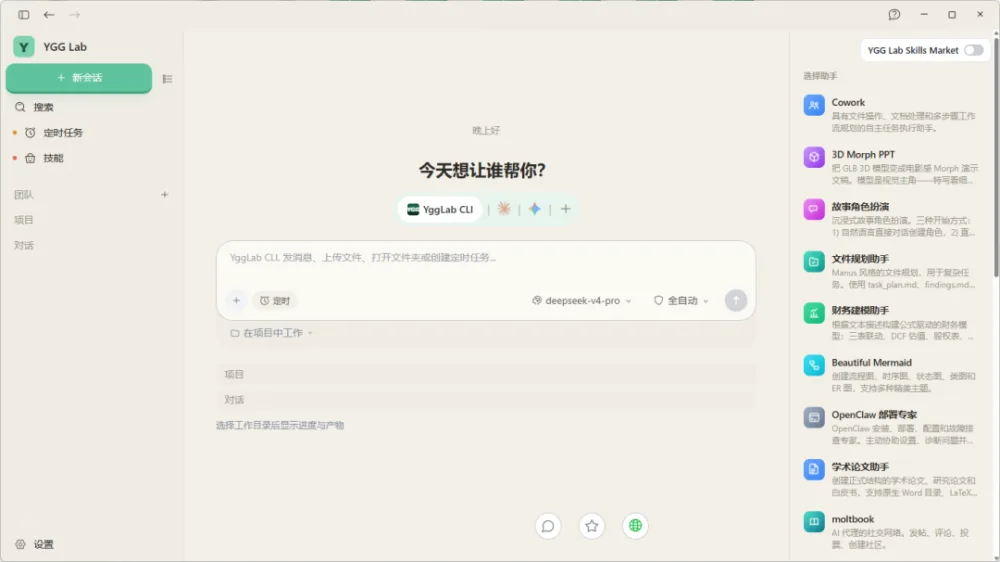
3. Step 3: Assign tasks like chatting
Just speak plainly — "Help me draft a weekly report" "Turn this data into a chart." The output lands directly on your computer, ready for further editing at any time.
5 You might be wondering
Q: How is it priced?
Contact a sales representative for a quote. Supports macOS / Windows / Linux.
Q: Will chat content be uploaded?
No. YGGLab runs locally; content never passes through any server. You choose which model to use and connect directly.
Q: Can I use it if I'm not a programmer?
Absolutely. It includes 20+ assistants covering PPT, spreadsheets, writing, and design. Just state your needs like you're chatting with a colleague.
Q: Does it conflict with my installed Claude Code / Codex?
No. It automatically reuses your existing tools without reinstalling or overwriting.
20+ agents are ready and waiting for your tasks.